Hi!
Setting the file associations under options doesn't work. The files won't be opened with XnView when I double click them.
I am using Win7 64bit. Running XnView as admin didn't help.
can't set file associations
Moderator: xnview
-
xnview

- Author of XnView
- Posts: 48401
- Joined: Mon Oct 13, 2003 7:31 am
- Location: France
Re: can't set file associations
Do you running XnView with context menu "Execute as admin"??
-
Mr Zombie
- Posts: 6
- Joined: Fri Dec 16, 2011 7:24 pm
Re: can't set file associations
to be precise: I run it with context menu "Run as administrator"
-
xnview
- Author of XnView
- Posts: 48401
- Joined: Mon Oct 13, 2003 7:31 am
- Location: France
Re: can't set file associations
Which association do you try to set?Mr Zombie wrote:to be precise: I run it with context menu "Run as administrator"
-
Mr Zombie
- Posts: 6
- Joined: Fri Dec 16, 2011 7:24 pm
Re: can't set file associations
I've tried jpg and png. Neither of them work. But XnView seems to remember which file types I have checkt after a restart.
I use ini file by the way.
I use ini file by the way.
-
xnview
- Author of XnView
- Posts: 48401
- Joined: Mon Oct 13, 2003 7:31 am
- Location: France
Re: can't set file associations
If you go in XnView, pnb&jpg are checked?Mr Zombie wrote:But XnView seems to remember which file types I have checkt after a restart.
-
Mr Zombie
- Posts: 6
- Joined: Fri Dec 16, 2011 7:24 pm
Re: can't set file associations
yes, they are checked in xnview. But they won't be opended with xnview when i double click them in windows explorer
-
xnview
- Author of XnView
- Posts: 48401
- Joined: Mon Oct 13, 2003 7:31 am
- Location: France
Re: can't set file associations
Which software is opened?Mr Zombie wrote:yes, they are checked in xnview. But they won't be opended with xnview when i double click them in windows explorer
-
xnview
- Author of XnView
- Posts: 48401
- Joined: Mon Oct 13, 2003 7:31 am
- Location: France
Re: can't set file associations
Ok, right, if an application create a 'UserChoice' key, XnView can't override it... I'll fix
-
Mr Zombie
- Posts: 6
- Joined: Fri Dec 16, 2011 7:24 pm
Re: can't set file associations
thank you, looking forward to it.
-
Elendil0
- Posts: 28
- Joined: Tue Apr 25, 2006 11:52 pm
Re: can't set file associations
Hi, I've same association problem :
xnview doesn't open anymore when I lauch a .jpg file for sample.
When I go to Options Associations, "jpg" is already checked ; I uncheck then check again => it generates an error window "ERR5, msg1, OK".
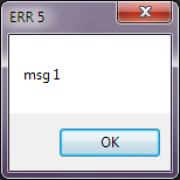
But nothing changes.
I'm under Win 7 64bit, with a 6 months old version of xnview that I updated for the occasion (1.98.8_ )
Is it the same issue that you've plan to fix?
xnview doesn't open anymore when I lauch a .jpg file for sample.
When I go to Options Associations, "jpg" is already checked ; I uncheck then check again => it generates an error window "ERR5, msg1, OK".
But nothing changes.
I'm under Win 7 64bit, with a 6 months old version of xnview that I updated for the occasion (1.98.8_ )
Is it the same issue that you've plan to fix?
-
xnview
- Author of XnView
- Posts: 48401
- Joined: Mon Oct 13, 2003 7:31 am
- Location: France
Re: can't set file associations
You have the 1.98.8 and option/associations doesn't work???Elendil0 wrote:Hi, I've same association problem :
-
bar_foo
- Posts: 17
- Joined: Fri Feb 16, 2007 8:27 pm
Re: can't set file associations
I'm having exactly the same problem, also in Win7 64 bit. I've tried running as admin and it doesn't help. XnView is also not an option in the Open With menu for image files.
-
xnview
- Author of XnView
- Posts: 48401
- Joined: Mon Oct 13, 2003 7:31 am
- Location: France
Re: can't set file associations
do you have installed from the zip or setup?bar_foo wrote:I'm having exactly the same problem, also in Win7 64 bit. I've tried running as admin and it doesn't help. XnView is also not an option in the Open With menu for image files.