Hi Pierre,
I’m following up on my earlier report in this thread.
Thanks again for looking into it and for fixing the previous bug.
I’ve now recompressed one of the original Galaxy S23 JPEGs with XnConvert (Windows), using JPEGLi as shown previously as output and “Rotate based on EXIF” afterwards again in XnViewMP. The result looks fine in most viewers, but I still see something strange in the EXIF thumbnail metadata.
When I open the converted file in XnView MP and look at the EXIF:
The main image is 3000 × 4000 pixels, Orientation = Horizontal (normal) – which is what I expect.
The embedded EXIF thumbnail is reported as 512 × 384 pixels (landscape orientation)?
If I extract the thumbnail image (e.g. with XnView MP or exiftool), the thumbnail itself looks correct, but the thumbnail size fields in the EXIF panel still show 512 × 384, which doesn’t match the portrait aspect of the main image.
I’ve attached:
the original converted JPEG:
https://www.dropbox.com/scl/fi/3brsd3pv ... t64xl&dl=0
When extracting hte Thumbnail using this cmd:
Code: Select all
exiftool -b ThumbnailImage 20250817_150706.jpg > thumbnail.jpg
as I mentioned, it looks good when viewing it ... (portrait orientation).
But the thumbnail width/height in EXIF does NOT look right:
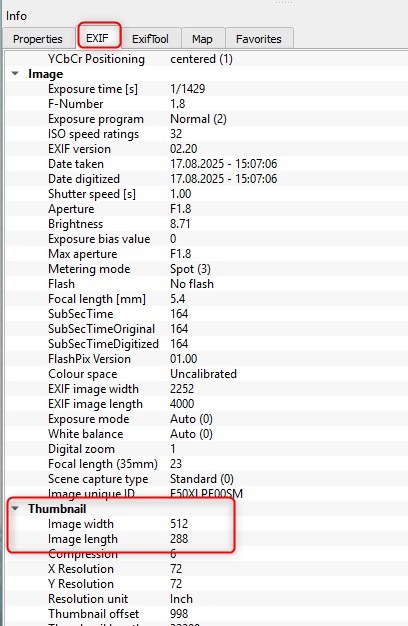
- 2025-12-05_19h56_34.jpg (66.93 KiB) Viewed 49 times
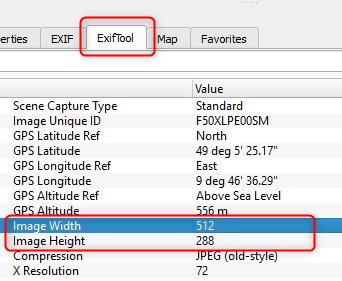
- 2025-12-05_19h57_58.jpg (31.41 KiB) Viewed 49 times
Could you please check whether the embedded thumbnail size metadata is being written correctly by XnConvert and/or XnViewMP in this case, or if there is still some inconsistency left over from the rotation step?
Thanks a lot in advance!

