Page 1 of 2
1.9.5: Rating filter does not return all matching photos from root folder of large collection
Posted: Sat Oct 04, 2025 4:04 pm
by venik
XnView: MP 1.9.4 - 64 bit
OS: Windows 11 - 64 bit
Short description:
When filtering photos by rating (e.g., ≥ 4 stars) from a root folder containing a large photo collection with “Show files in subfolders” enabled, not all matching photos from subfolders are displayed.
Effect:
User cannot correctly view or manage all photos with the desired rating. The “Show files in subfolders” option is very slow and incomplete, making the filter unreliable for large collections.
To reproduce:
1. Open a root folder containing many subfolders (e.g., structured by year/month YYYY_MM).
(in my case a large collection of TB images/videos)
2 Enable “Show files in subfolders.”
3 Apply a rating filter (e.g., “≥ 4 stars”).
Actual behaviour (bug):
- The “Show files in subfolders” operation is slow and does not display all files.
- The rating filter only shows a subset of photos that meet the criteria, but not all matching files from subfolders.
 Expected behaviour:
Applying a rating filter at the root level when "Show files in subfolders" is enabled should display all photos matching the selected rating, regardless of folder hierarchy.
The operation should not require pre-loading or expanding all subfolders manually.
Thank you in advance!
Love XnView!
Re: 1.9.4: Rating filter does not return all matching photos from root folder of large collection
Posted: Wed Oct 08, 2025 2:53 pm
by xnview
venik wrote: Sat Oct 04, 2025 4:04 pm
- The “Show files in subfolders” operation is slow and does not display all files.
Without rating filter do you have same delay?
- The rating filter only shows a subset of photos that meet the criteria, but not all matching files from subfolders.
If you try that files are correctly scanned, is it working?
Re: 1.9.4: Rating filter does not return all matching photos from root folder of large collection
Posted: Sun Oct 12, 2025 9:33 pm
by venik
Hi,
thank you for your support.
Without rating filter do you have same delay?
Yes
If you try that files are correctly scanned, is it working?
No, I still miss photos that match the rating filter.
If I go directly to one of the missing image files, I can see the rating stars correctly, and the image can be filtered.
I also noticed that after performing the previous step on a missing image, when I go back to the root folder,
suddenly appears as expected.
Thank you in advance
Re: 1.9.4: Rating filter does not return all matching photos from root folder of large collection
Posted: Mon Oct 13, 2025 8:34 am
by xnview
please try 1.9.5
Re: 1.9.4: Rating filter does not return all matching photos from root folder of large collection
Posted: Fri Oct 17, 2025 10:34 pm
by venik
Hello!
I have tried with 1.9.5
Unfortunately same behavior of 1.9.4:
- Some photos that match the rating filter are missing from the results.
- If I open one of the missing image files directly, the rating stars are visible and the image can be filtered correctly.
- After doing this and returning to the root folder, the previously missing image suddenly appears withe the rating filter.
Thank you for your support
Re: 1.9.4: Rating filter does not return all matching photos from root folder of large collection
Posted: Mon Oct 20, 2025 7:51 am
by xnview
if you click on the rating in 'catalog filter' panel, the missing files are here? Perhaps the missing files are not imported in catalog
Re: 1.9.4: Rating filter does not return all matching photos from root folder of large collection
Posted: Fri Oct 31, 2025 10:02 pm
by venik
xnview wrote: Mon Oct 20, 2025 7:51 am
if you click on the rating in 'catalog filter' panel, the missing files are here? Perhaps the missing files are not imported in catalog
Clicking on the rating in the Catalog Filter panel produces the same result.
I’ve performed a full catalog reimport, but the issue persists.
Spending significant time classifying my photos, this behavior is quite problematic.
Have you been able to reproduce the issue on your side?
Thank you for your support.
Re: 1.9.4: Rating filter does not return all matching photos from root folder of large collection
Posted: Tue Nov 04, 2025 9:48 am
by xnview
venik wrote: Fri Oct 31, 2025 10:02 pm
Clicking on the rating in the Catalog Filter panel produces the same result.
I’ve performed a full catalog reimport, but the issue persists.
So files are not associated to correct rating.
Have you been able to reproduce the issue on your side?
what do you have in Settings>Metadata?
could you send me a file not shown by rating in catalog filter but should be here?
Re: 1.9.5: Rating filter does not return all matching photos from root folder of large collection
Posted: Sun Nov 16, 2025 9:06 pm
by venik
Hello,
sorry for the late answer
Here you have an example of photo rated 5 start but missing:
https://www.dropbox.com/scl/fi/htenwwv0 ... s9wng&dl=0
(photos too big to be attached)
My metadata settings:
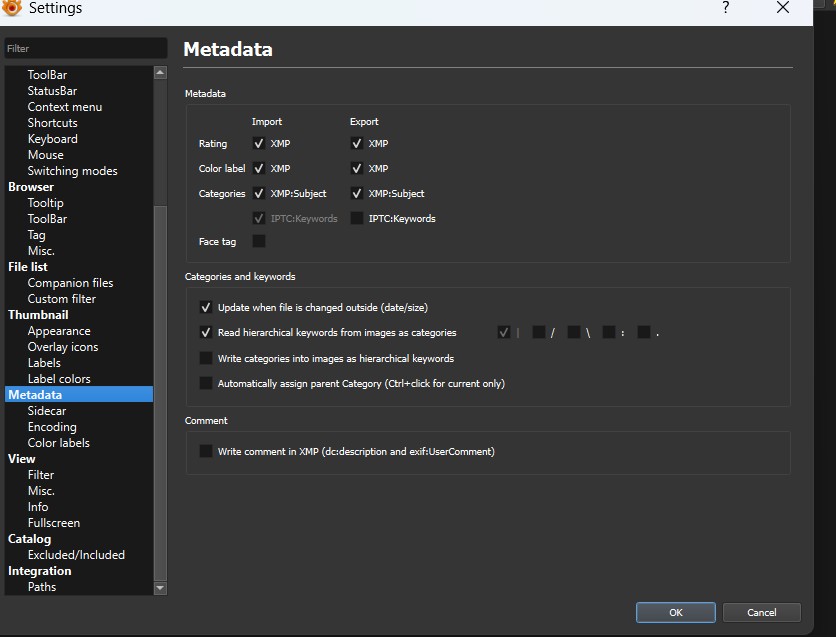
- metadatasetting
- MetadataSetting.jpg (69.92 KiB) Viewed 253 times
Thank you in advance
Vincenzo
Re: 1.9.5: Rating filter does not return all matching photos from root folder of large collection
Posted: Tue Nov 18, 2025 2:10 pm
by xnview
Your image file has rating in XMP, so when i click on 'Category Filter' i have it
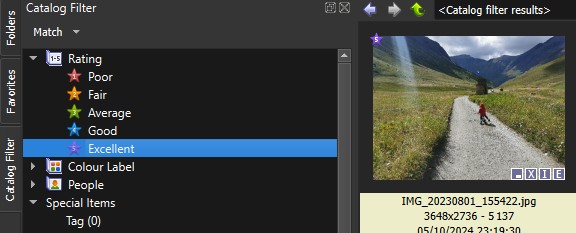
- Capture-1.jpg (35.95 KiB) Viewed 219 times
, not you?
Re: 1.9.5: Rating filter does not return all matching photos from root folder of large collection
Posted: Thu Nov 20, 2025 10:08 pm
by venik
Hello,
thank you for your time.
No, I still cannot see it if I:
1. Open a root folder containing many subfolders (e.g., structured by year/month YYYY_MM).
(In my case, a very large collection with TBs of images and videos.)
2. Enable “Show files in subfolders.”
3. Apply the Excellent rating filter.
On the contrary, I can find the image if I filter directly inside its subfolder.
AND after visualizing it I can then find it also filtering from the root folder..
Let me also remark that having to enable “Show files in subfolders” or "Match current folder (recursive)" in order to filter is really is extremely slow, as it seems to scan all files first and only then apply the filter.
Thank you in advance
Re: 1.9.5: Rating filter does not return all matching photos from root folder of large collection
Posted: Fri Nov 21, 2025 4:45 am
by user0
is Match setting set to Global in Catalog Filter pane?
Re: 1.9.5: Rating filter does not return all matching photos from root folder of large collection
Posted: Fri Nov 21, 2025 7:09 pm
by venik
Hello,
it is set to “Match current folder (recursive)”,
however, changing it to “Global”, unfortunately, doesn’t change the situation.
Thank you in advance
Re: 1.9.5: Rating filter does not return all matching photos from root folder of large collection
Posted: Fri Nov 21, 2025 10:44 pm
by michel038
Did you try to renew the whole catalog ?(only if your ratings and other tags are saved as metadata )
- Save a copy of xnview.db file before starting XnV
- Settings Metadata : ensure xmp import options are enabled
- Settings Catalog : delete all
- Settings catalog : add folder (select the parent folder for your entire set of photos)
- Wait (about 15 min for 10 000 photos to be read ...)
- - The catalog should be complete.
Re: 1.9.5: Rating filter does not return all matching photos from root folder of large collection
Posted: Sat Nov 22, 2025 7:54 am
by xnview
venik wrote: Thu Nov 20, 2025 10:08 pm
1. Open a root folder containing many subfolders (e.g., structured by year/month YYYY_MM).
(In my case, a very large collection with TBs of images and videos.)
and if you open the folder containing this file?
do you use 'base path' in Settings>Catalog?