XnTriq ([url=http://newsgroup.xnview.com/viewtopic.php?p=65403#p65403]Corrupt jpegs, thumbnail extracted...[/url]) wrote:
- Alien Skin: Blow Up
- Bearded Frog: Enlarger PRO
- onOne: Genuine Fractals
- MeeSoft: Image Analyzer + Fractal interpolation
- Kneson: Imagener (p/k/a ZSpline)
- Nikola Dachev: ImageScaler
- Giovanni Brembati: PhotoResampling
- BenVista: PhotoZoom Pro (p/k/a S-Spline)
- Extensis: pxl SmartScale
- ddisoftware: Qimage
- Vlad Hosu: Reshade
- Brian Spangler: ResizeIT
- Fred Miranda: Resize Pro
- Peter Werner: Resizor
- Dr. Steven A. Ruzinsky: SAR Image Processor
- FixerLabs: SizeFixer
- STOIK Imaging: Smart Resizer
- Mischa Lusteck: SmillaEnlarger
- HumanSoftware: XFile
- Mehdi: Zoom Engine
Upscaling / Enlarging
Moderator: xnview
-
XnTriq

- Forum Librarian
- Posts: 6572
- Joined: Sun Sep 25, 2005 3:00 am
- Location: Ref Desk
Upscaling / Enlarging
Thanks to fellow “XnThusiast” cday, I learned about a freeware program the other day that promises better image scaling quality and can upscale and enlarge photos better than Photoshop's “Preserve Details” algorithm: Steffen Gerlach's “A Sharper Scaling is a high quality image scaling technology mainly developed for upscaling.”
-
michel038

- XnThusiast
- Posts: 1574
- Joined: Tue Sep 27, 2016 8:18 am
- Location: France
Re: Upscaling / Enlarging
Upscaling icons, drawings
http://waifu2x.me/
It's a on-line utility , upscaling up to 10x10, using Deep Convolutional Neural Networks
(it's a bit slow, so test with small pictures)
Original picture

Zoom in

Classic soft

Using Waifu

You can also clean photos for jpeg artefacts : (style: photo, magnification :0 , noise reduction high)
Before
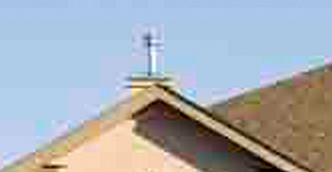
After

http://waifu2x.me/
It's a on-line utility , upscaling up to 10x10, using Deep Convolutional Neural Networks
(it's a bit slow, so test with small pictures)
Original picture
Zoom in
Classic soft
Using Waifu
You can also clean photos for jpeg artefacts : (style: photo, magnification :0 , noise reduction high)
Before
After
Last edited by michel038 on Tue Nov 25, 2025 10:12 pm, edited 1 time in total.
Catalogage avec XnviewMP :
https://orchisere.fr/logiciels/html/xnviewmpintro.htm
Tutoriel exiftool : https://orchisere.fr/logiciels/html/exiftool.htm
https://orchisere.fr/logiciels/html/xnviewmpintro.htm
Tutoriel exiftool : https://orchisere.fr/logiciels/html/exiftool.htm
-
XnTriq
- Forum Librarian
- Posts: 6572
- Joined: Sun Sep 25, 2005 3:00 am
- Location: Ref Desk
Re: Upscaling / Enlarging
Thank you for the examples, michel038 
cday had brought waifu2x to my attention last year when it was first released to the public, but at the time I failed to realize that its potential uses go beyond anime-style art.
cday had brought waifu2x to my attention last year when it was first released to the public, but at the time I failed to realize that its potential uses go beyond anime-style art.
- GitHub: waifu2x-caffe
XnTriq ([url=http://newsgroup.xnview.com/viewtopic.php?p=110938#p110938]Pixel art scaling algorithms such as hq2x, 2xsai, etc[/url]) wrote:
- Microsoft Research
- Depixelizing Pixel Art
Naïve upsampling of pixel art images leads to unsatisfactory results. Our algorithm extracts a smooth, resolution-independent vector representation from the image which is suitable for high-resolution display devices.- Pixenlarge
Pixenlarge is an image enlargement tool. It is distributed both as a plug in for Adobe Photoshop and also as a standalone application. It is mainly specialized in enlarging drawn images, such as e.g. clip arts, icons, drawings, sketches, cartoons etc.- Scale2x
Scale2x is real-time graphics effect able to increase the size of small bitmaps guessing the missing pixels without blurring the images.
-
captaincavern
- Posts: 44
- Joined: Fri Dec 13, 2013 6:31 am
Re: Upscaling / Enlarging
Two more good ones (both free )
http://www.fitswork.de/software/softw_en.php
http://cas.eedept.kobe-u.ac.jp/WelcomeE ... ex_en.html
SAR's PseudoLAD is my fav though.
PS: And this for pixel art: https://sourceforge.net/projects/xbrz/ (Get ScalerTest app)

)http://www.fitswork.de/software/softw_en.php
http://cas.eedept.kobe-u.ac.jp/WelcomeE ... ex_en.html
SAR's PseudoLAD is my fav though.
PS: And this for pixel art: https://sourceforge.net/projects/xbrz/ (Get ScalerTest app)
-
XnTriq
- Forum Librarian
- Posts: 6572
- Joined: Sun Sep 25, 2005 3:00 am
- Location: Ref Desk
Re: Upscaling / Enlarging
Thanks, captaincavern!
Tutorials I found helpful (JavaScript required):
Tutorials I found helpful (JavaScript required):
- General Cathexis (SAR Image Processor): Comparisons of Image Magnification Methods
- PixInsight: Interpolation Algorithms » Upsampling Examples
-
regs
- Posts: 16
- Joined: Tue Jul 26, 2016 9:05 pm
Re: Upscaling / Enlarging
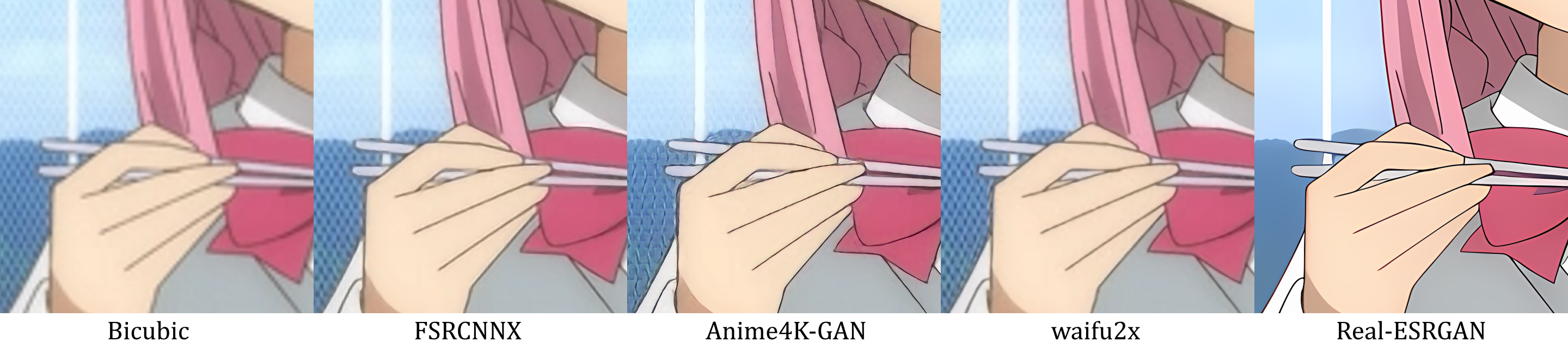
Anime4K, FSRCNNX and NIS would also be good
https://github.com/bloc97/Anime4K
https://github.com/NVIDIAGameWorks/NVIDIAImageScaling
https://raw.githubusercontent.com/bloc9 ... 60p_4K.png
https://github.com/bloc97/Anime4K
https://github.com/NVIDIAGameWorks/NVIDIAImageScaling
https://raw.githubusercontent.com/bloc9 ... 60p_4K.png
-
faltonico
- Posts: 43
- Joined: Thu Nov 07, 2013 2:37 am
Re: Upscaling / Enlarging
FSR 2.0 which is open source, can also be used to upscale still images, besides renders... command line only for now:
https://github.com/GPUOpen-Effects/FidelityFX-FSR2
https://github.com/GPUOpen-Effects/FidelityFX-FSR2
-
Neuro-NX
- Posts: 24
- Joined: Wed Aug 31, 2022 9:38 pm
Re: Upscaling / Enlarging
I use this AI application for upscaling, interpolation and enhancing videos, and upscaling and enhancing photos.
Topaz Photo AI - https://www.topazlabs.com/topaz-photo-ai
Topaz Video AI - https://www.topazlabs.com/topaz-video-ai
I also use Davinci Resolve to then do further adjustment using the Topaz Video AI plugin.
Topaz Photo AI - https://www.topazlabs.com/topaz-photo-ai
Topaz Video AI - https://www.topazlabs.com/topaz-video-ai
I also use Davinci Resolve to then do further adjustment using the Topaz Video AI plugin.
-
michel038
- XnThusiast
- Posts: 1574
- Joined: Tue Sep 27, 2016 8:18 am
- Location: France
Re: Upscaling / Enlarging
I tried ChatGPT free
Source file
detail :
zoom in 500% : Result detail : Prompt :
"Can you enlarge this image (double each dimension) without changing its appearance? Only smoothing to avoid aliasing."
Source file
detail :
zoom in 500% : Result detail : Prompt :
"Can you enlarge this image (double each dimension) without changing its appearance? Only smoothing to avoid aliasing."
You do not have the required permissions to view the files attached to this post.
Catalogage avec XnviewMP :
https://orchisere.fr/logiciels/html/xnviewmpintro.htm
Tutoriel exiftool : https://orchisere.fr/logiciels/html/exiftool.htm
https://orchisere.fr/logiciels/html/xnviewmpintro.htm
Tutoriel exiftool : https://orchisere.fr/logiciels/html/exiftool.htm