Hi
maybe I miss something but
since I upgraded to 0.75 the "directories" (dossiers) panel does not keep its size when I close MP
I use to display a preview panel on upper right corner of the screen and the list of directories on the lower right corner of the screen,
I change the size of the "directories" panel but when I close MP ans open it again, the size of the panel has changed
I have to resize it everytime, annoying....
maybe there is a parameter somewhere in "options" menu ?
thanks for your help
MP 0.75 Directories Panel
Moderators: xnview, Dreamer
-
xnview

- Author of XnView
- Posts: 48243
- Joined: Mon Oct 13, 2003 7:31 am
- Location: France
Re: MP 0.75 Directories Panel
strange i have not this problem. Could you post a screenshot of XnViewMP layout?
-
gonzos-revenge
- Posts: 18
- Joined: Mon Dec 24, 2007 8:36 am
Re: MP 0.75 Directories Panel
Got the same problem with the size of the preview window of the thumpnails in viewer mode.
Screenshot 2 shows the size I prefer but it´s only be kept until MP is closed or restarted.
Screenshot 1 shows the size MP is showing at every new startup.
Tried different thinks in control panel, but nothing changed this behaviour.
Bug is present since MP0.75, all versions before worked fine.
Also XnView 2.34 is keeping the size.
Screenshot 2 shows the size I prefer but it´s only be kept until MP is closed or restarted.
Screenshot 1 shows the size MP is showing at every new startup.
Tried different thinks in control panel, but nothing changed this behaviour.
Bug is present since MP0.75, all versions before worked fine.
Also XnView 2.34 is keeping the size.
You do not have the required permissions to view the files attached to this post.
-
xnview
- Author of XnView
- Posts: 48243
- Joined: Mon Oct 13, 2003 7:31 am
- Location: France
Re: MP 0.75 Directories Panel
if the window is not maximized, do you have the problem too?
-
gonzos-revenge
- Posts: 18
- Joined: Mon Dec 24, 2007 8:36 am
Re: MP 0.75 Directories Panel
Just tried it and MP is remembering the settings if the window is not maximized.
Thanks to your hint I got a solution for my problem.
I decided to take a look at the properties of the MP shortcut on my desktop, and it was set to "normal window".
Changing the properties to "maximized" did the trick. MP is now keeping the size.
Thanks a lot.
Thanks to your hint I got a solution for my problem.
I decided to take a look at the properties of the MP shortcut on my desktop, and it was set to "normal window".
Changing the properties to "maximized" did the trick. MP is now keeping the size.
Thanks a lot.
-
cyril59
- Posts: 2
- Joined: Sun Sep 27, 2015 7:07 pm
Re: MP 0.75 Directories Panel
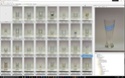
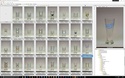
when the preview panel is upper-right, its size changes when I close/open MP
same behavior when preview panel is lower right
very annoying