Custom keyboard shortcuts don't work
Moderator: xnview
-
smallwood13
- Posts: 2
- Joined: Mon Jan 09, 2017 4:40 am
Custom keyboard shortcuts don't work
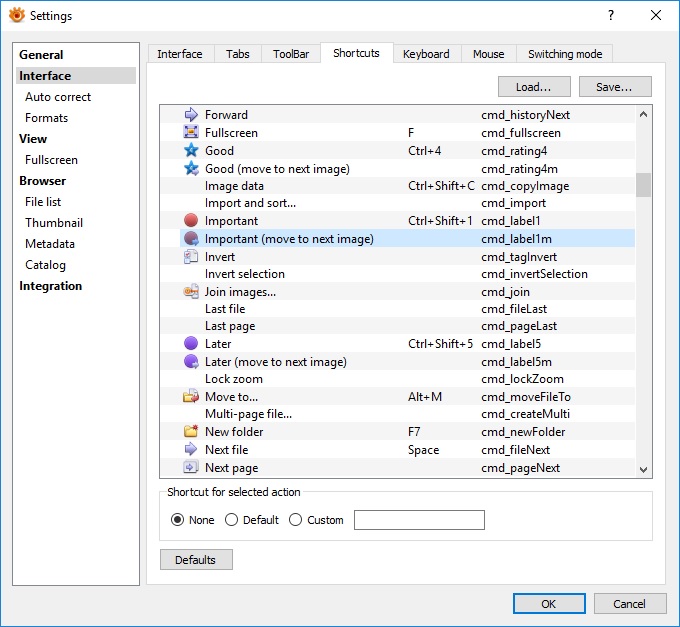
Hello, I'm trying to set up custom keyboard shortcuts, but they don't work. For example I setup "f" for full screen and "Space" for Next file, but nothing happened. Default shortcuts continue working (F11 for full screen), but not new ones.
-
helmut

- Posts: 8704
- Joined: Sun Oct 12, 2003 6:47 pm
- Location: Frankfurt, Germany
Re: Custom keyboard shortcuts don't work
The shortcuts are divided by modes: Browser mode and View mode. From what I can see, you have specified shortcuts for Browser mode, i.e. these shortcuts will work in browser mode, only. Is this perhaps the problem?
You do not have the required permissions to view the files attached to this post.
-
smallwood13
- Posts: 2
- Joined: Mon Jan 09, 2017 4:40 am
Re: Custom keyboard shortcuts don't work
You are right, thank you!
-
cday
- XnThusiast
- Posts: 4615
- Joined: Sun Apr 29, 2012 9:45 am
- Location: Cheltenham, U.K.
Re: Custom keyboard shortcuts don't work
Wouldn't it be better if the Interface > Shortcuts design was similar to that for Interface > Toolbar, if that is possible?helmut wrote:The shortcuts are divided by modes: Browser mode and View mode
You do not have the required permissions to view the files attached to this post.
-
helmut
- Posts: 8704
- Joined: Sun Oct 12, 2003 6:47 pm
- Location: Frankfurt, Germany
Re: Custom keyboard shortcuts don't work
+1 Yes, atm definining a shortcut for the wrong mode can happen very easily, which is no good.cday wrote:Wouldn't it be better if the Interface > Shortcuts design was similar to that for Interface > Toolbar, if that is possible?helmut wrote:The shortcuts are divided by modes: Browser mode and View mode
-
MARK2580

- Posts: 92
- Joined: Tue Nov 20, 2018 5:22 am
Re: Custom keyboard shortcuts don't work
Two years have passed, and the problem still remains. If you assign one button to a function, it DOES NOT WORK. If you assign a combination then WORKS. But I need exactly one button.
-
xnview

- Author of XnView
- Posts: 48688
- Joined: Mon Oct 13, 2003 7:31 am
- Location: France
Re: Custom keyboard shortcuts don't work
which shortcut?MARK2580 wrote: Wed Apr 17, 2019 11:42 am Two years have passed, and the problem still remains. If you assign one button to a function, it DOES NOT WORK. If you assign a combination then WORKS. But I need exactly one button.
-
MARK2580
- Posts: 92
- Joined: Tue Nov 20, 2018 5:22 am
Re: Custom keyboard shortcuts don't work
Any. For example, from the beginning I wanted to assign F3 to open the batch conversion dialog. Then to check that it really does not work, I changed the rename function from F2 to F3 and it did not work until I returned F2 by default.
-
xnview
- Author of XnView
- Posts: 48688
- Joined: Mon Oct 13, 2003 7:31 am
- Location: France
Re: Custom keyboard shortcuts don't work
F3/F4 are assigned to OpenWith, F12 About, F2 rename, F7 new folder, F5 refresh, F11 fullscreen and can't be changed
-
MARK2580
- Posts: 92
- Joined: Tue Nov 20, 2018 5:22 am
Re: Custom keyboard shortcuts don't work
Why, then, is there a function to change these hot keys if you cannot change them ? Don't you think this is stupid ?xnview wrote: Fri Apr 19, 2019 9:50 am F3/F4 are assigned to OpenWith, F12 About, F2 rename, F7 new folder, F5 refresh, F11 fullscreen and can't be changed
Those. judging by your answer, I can not assign anything to F3 ?
-
xnview
- Author of XnView
- Posts: 48688
- Joined: Mon Oct 13, 2003 7:31 am
- Location: France
Re: Custom keyboard shortcuts don't work
I'm wrong, you can change them. Only F3/F4 can't be changedMARK2580 wrote: Mon Apr 22, 2019 1:02 pmWhy, then, is there a function to change these hot keys if you cannot change them ? Don't you think this is stupid ?xnview wrote: Fri Apr 19, 2019 9:50 am F3/F4 are assigned to OpenWith, F12 About, F2 rename, F7 new folder, F5 refresh, F11 fullscreen and can't be changed
Those. judging by your answer, I can not assign anything to F3 ?
-
MARK2580
- Posts: 92
- Joined: Tue Nov 20, 2018 5:22 am
Re: Custom keyboard shortcuts don't work
Okay, this is still strange. But then I managed to install batch processing on F6.
-
Pterry
- Posts: 11
- Joined: Tue Jul 27, 2021 7:54 am
Re: Custom keyboard shortcuts don't work
I have a similar problem:
I have two Ini files for XNViewMP for using different databases. Both intances have some customizations (like themes, arrangement of controls, toolbars, etc.).
In both instances, I have manually set F12 to cmd_rebuildThumb. (Setting this in instance A does not set in instance B automatically)
The shortcut then always worked in instance A, but never in B, no matter if I only start one of them or both.
If I assign another shortcut in instance B (like CTRL-SHIFT-M), this shortcut works, but F12 no longer works in instance A (nor does CTRL-SHIFT-M). If I then set CTRL-SHIFT-M in instance A, it works in A, but no longer in B.
I hope, this wasn't too confusing
I also wonder, where the keyboard shortcuts are stored? I could not find them in the INI- files or the registry.
I have two Ini files for XNViewMP for using different databases. Both intances have some customizations (like themes, arrangement of controls, toolbars, etc.).
In both instances, I have manually set F12 to cmd_rebuildThumb. (Setting this in instance A does not set in instance B automatically)
The shortcut then always worked in instance A, but never in B, no matter if I only start one of them or both.
If I assign another shortcut in instance B (like CTRL-SHIFT-M), this shortcut works, but F12 no longer works in instance A (nor does CTRL-SHIFT-M). If I then set CTRL-SHIFT-M in instance A, it works in A, but no longer in B.
I hope, this wasn't too confusing
I also wonder, where the keyboard shortcuts are stored? I could not find them in the INI- files or the registry.
-
Pterry
- Posts: 11
- Joined: Tue Jul 27, 2021 7:54 am
Re: Custom keyboard shortcuts don't work
So... after testing this a little more, I found out that this odd behaviour does only occur when I try to assign F12 to cmd_rebuildThumb. The F12 key then sometimes works in one of both instances, sometimes in none of them, but never in both.
But if I assign CTRL-12 to cmd_rebuildThumb in both instances, it seems to work fine. I can happily live with that, maybe this information is useful for someone else.
But if I assign CTRL-12 to cmd_rebuildThumb in both instances, it seems to work fine. I can happily live with that, maybe this information is useful for someone else.