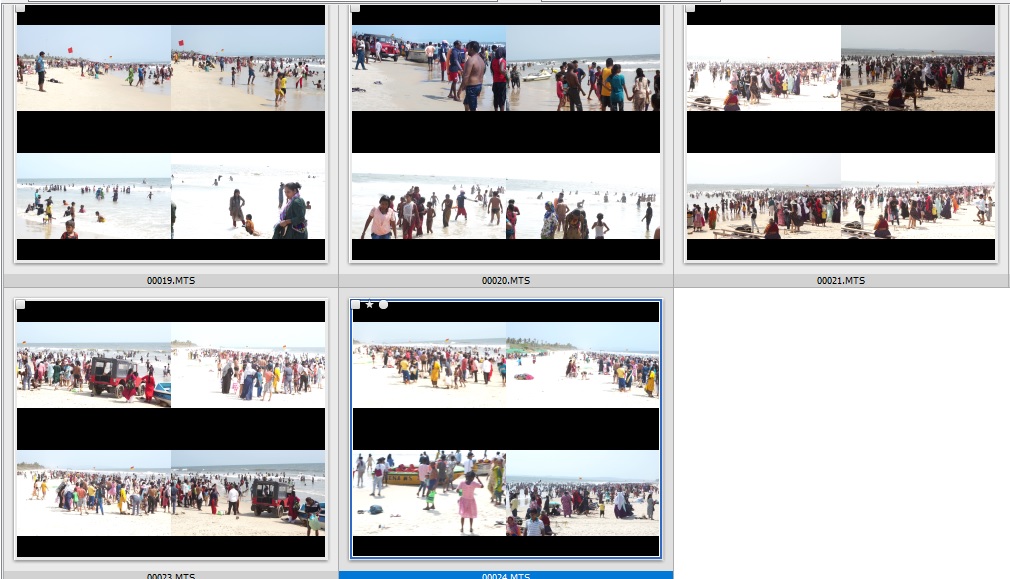
option to Crop video thumbnails to avoid black bars.

Ideas for improvements and requests for new features in XnView MP

Moderator: xnview

FKCapitalism2
Posts: 380
Joined: Sun Apr 23, 2023 5:14 am

option to Crop video thumbnails to avoid black bars.

Post by FKCapitalism2 »

Possible to have pictures for video cropped square to not show top and bottom black bars on thumbnails?

Image

Perhaps option crop and make thumbnails to fit perfectly?

Videos i have do not have black bars in video, its way XnView MP generates thumbnails.
FKCapitalism2
Posts: 380
Joined: Sun Apr 23, 2023 5:14 am

Re: option to Crop video thumbnails to avoid black bars.

Post by FKCapitalism2 »

Nice feature would be to embed video runtime in the bottom right corner of last thumbnail.
geoffm
Posts: 21
Joined: Fri Nov 06, 2015 6:54 pm

Re: option to Crop video thumbnails to avoid black bars.

Post by geoffm »

Yes that feature would be nice, "crop thumbnails to maximize used space" as opposed to "shrink thumbnail and preserve ratio, leaving empty space"
User avatar
user0
XnThusiast
Posts: 2850
Joined: Sat May 09, 2015 9:37 am

Re: option to Crop video thumbnails to avoid black bars.

Post by user0 »

it could be just another Auto zoom combobox with few 'Fit image to thumbnail...' options (in Settings>Thumbnail)
  • single combobox

    OR
  • two comboboxes
    - for large images AND
    - for small images (eg icons, pixelart) with only 2 options: 'No fit' and 'Fit to thumbnail', as cropping is rarely needed in this case