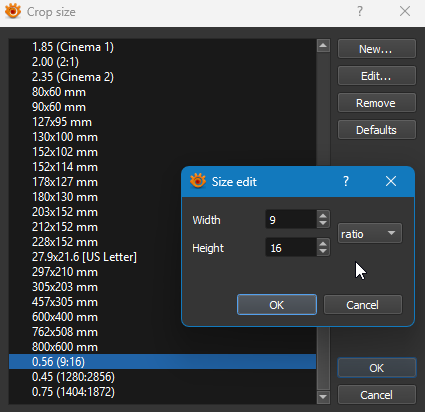
Anyone have any idea why all of my portrait crop sizes are suddenly behaving like landscape? I have restarted the program and I still have the issue. Here is an example of one of my crop sizes which is now producing a horizontal rectangle cropping box instead of vertical (like it used to):
i.e. ALL of my crops are always horizontal now and I can no longer do any kind of portrait crop no matter how I set it. I'm hoping there is some setting I accidentally toggled that someone might know about.
You're just confused about how the program actually works...
XnViewMP has some idiosyncratic (i.e. bad) behavior when it comes to cropping, and some people don't like it. It's been complained about for years.
Basically, regardless of what you see in the crop preset menu, when you use a RATIO crop, XnViewMP matches the orientation of the crop to the orientation of the image. In other words, if you crop a portrait image, you get a portrait shaped marquee. If you crop a landscape image, you get a landscape shaped marquee. (But it's easy to flip it.)
So if your ratio is 16:9, and you crop an image wider than it is tall, you get a 16:9 marquee; but if the image is taller than it is wide, the selection box will be 9:16.
This only applies to Ratio crops. Inch/cm/pixel crops behave as specified. As I said, this has been complained about before.
I agree it is bad behavior to show both ratios (9:16 and 16:9) in the menu, even when the ratio used will still depend on the image orientation. If you try cropping a portrait-orientation image, you'll find that all your ratio crops now start off taller than wide. Based on your statements, the image you're testing your crops on is landscape. I'll also point out that ALL of your ratios (except the last 3) are defined as landscape. So they will behave as you expect when you crop a landscape image, and you wouldn't be complaining. But if you tried cropping a portrait image, you'd get a surprise. Those last three ratios are portrait shape, and since you're trying to crop a landscape image, they don't behave as you expect, and here we are.
Also, looking at your screenshot, you have a Ratio crop of 0.45 (1280:2856) defined. With those dimensions, it looks like you were counting pixels, but you created a ratio crop. If you changed that one to pixel mode, it would always crop exactly as specified.
Your solution for ratio crops is to just flip the orientation of the marquee. Once the selection box is on the screen, either tap the W key (by default) or click the <> button that you see in the crop toolbar.