XnView MP 1.12.3, macOS
Since a recent update (no sure which ones), each entry in the browser’s address bar history has a small × button to remove it. The idea makes sense, but I keep deleting entries by accident: the × is easy to click when I’m only trying to pick a folder from the list, and there’s no undo.
I wonder if a setting to hide the × button (that I never use, except accidentally) would be possible?
Or perhaps a confirmation before removing an entry?
Address bar history: option to hide the remove (×) button, or confirm before removing
Moderator: xnview
-
laurent45654
- Posts: 46
- Joined: Sat Dec 21, 2024 6:54 pm
-
bugreporter

- Posts: 31
- Joined: Tue Dec 05, 2017 1:15 pm
Re: Address bar history: option to hide the remove (×) button, or confirm before removing
This is new since 1.12.3, together with the breadcrumb view.laurent45654 wrote: Sun Nov 15, 2026 11:38 am ... Since a recent update (no sure which ones), each entry in the browser’s address bar history has a small × button to remove it ...
... I keep deleting entries by accident: the × is easy to click when I’m only trying to pick a folder from the list ...
I don't know how your Mac system reacts, but on a Windows PC, I find it hard to exactly "hit the mark" by accident. Only intentionally, and then not clicking a millimeter away from the x.
-
laurent45654
- Posts: 46
- Joined: Sat Dec 21, 2024 6:54 pm
Re: Address bar history: option to hide the remove (×) button, or confirm before removing
The problem is that the cross is right next to the dropdown arrow:
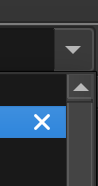
So for me I simply click the dropdown, try to click one of the entry immediately below, and then end up clicking on the cross. And since that can't be undone and there's no prompt, I have to browse again to whatever path I was trying to click.
So for me I simply click the dropdown, try to click one of the entry immediately below, and then end up clicking on the cross. And since that can't be undone and there's no prompt, I have to browse again to whatever path I was trying to click.