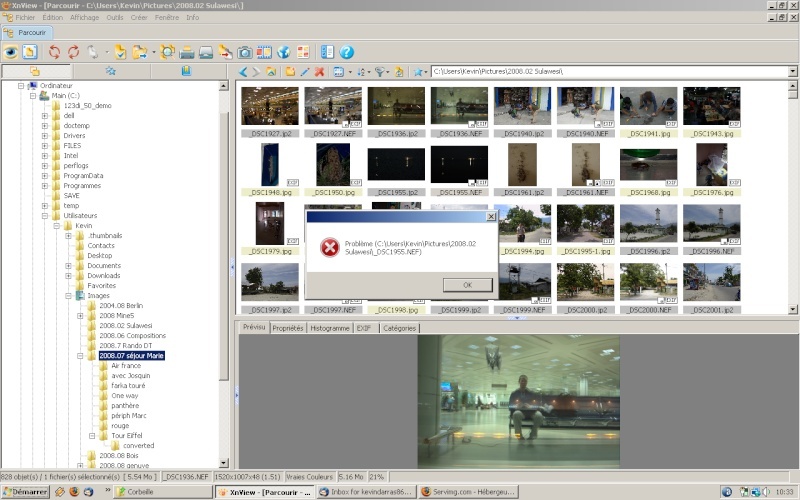
I get an error message with a big red cross every time I want to move a selected picture to another folder when its preview has not been generated yet.
It's the same if for a bunch of selected pictures, if I drag from the image which is not shown in the preview.
In both cases you have to wait until the image is processed to start dragging it to another folder.
Could we have a shortcut?
handle pictures without bug
Moderator: xnview
-
xnview

- Author of XnView
- Posts: 48697
- Joined: Mon Oct 13, 2003 7:31 am
- Location: France
Re: handle pictures without bug
Which big red cross? Which system do you have?
-
darrask
- Posts: 73
- Joined: Mon May 12, 2008 6:41 am
- Location: Paris
-
xnview
- Author of XnView
- Posts: 48697
- Joined: Mon Oct 13, 2003 7:31 am
- Location: France
-
darrask
- Posts: 73
- Joined: Mon May 12, 2008 6:41 am
- Location: Paris
OK, I think I was not clear:
This problem occurs also in folders in which the thumbnails are already cached, generated and displayed.
I meant that moving by drag'n drop is not possible when the PREVIEW ("prévisu" tab in the split window next to properties, histogram and categories tabs) of the picture being dragged (singly or in a group selection) is not shown yet.
This problem occurs also in folders in which the thumbnails are already cached, generated and displayed.
I meant that moving by drag'n drop is not possible when the PREVIEW ("prévisu" tab in the split window next to properties, histogram and categories tabs) of the picture being dragged (singly or in a group selection) is not shown yet.
-
xnview
- Author of XnView
- Posts: 48697
- Joined: Mon Oct 13, 2003 7:31 am
- Location: France
I can't reproduce. Which system do you have? Which version of xnview?darrask wrote:OK, I think I was not clear:
This problem occurs also in folders in which the thumbnails are already cached, generated and displayed.
I meant that moving by drag'n drop is not possible when the PREVIEW ("prévisu" tab in the split window next to properties, histogram and categories tabs) of the picture being dragged (singly or in a group selection) is not shown yet.
-
darrask
- Posts: 73
- Joined: Mon May 12, 2008 6:41 am
- Location: Paris
-
xnview
- Author of XnView
- Posts: 48697
- Joined: Mon Oct 13, 2003 7:31 am
- Location: France
Ok, i understand. The problem is with long loading of nef. When you select nef files, xnview load the current file for preview. So you can't move/copy before this process is finished. So perhaps you can use 'embedded thumbnail' in option/View/Misc/RAWdarrask wrote:I tried on both 1.93.6 and 1.95b2, I have Vista SP1, it was the same without SP1, however I just tried on XP with a friend, and there is no such problem.
-
darrask
- Posts: 73
- Joined: Mon May 12, 2008 6:41 am
- Location: Paris
-
xnview
- Author of XnView
- Posts: 48697
- Joined: Mon Oct 13, 2003 7:31 am
- Location: France
-
darrask
- Posts: 73
- Joined: Mon May 12, 2008 6:41 am
- Location: Paris
-
xnview
- Author of XnView
- Posts: 48697
- Joined: Mon Oct 13, 2003 7:31 am
- Location: France
-
darrask
- Posts: 73
- Joined: Mon May 12, 2008 6:41 am
- Location: Paris
-
xnview
- Author of XnView
- Posts: 48697
- Joined: Mon Oct 13, 2003 7:31 am
- Location: France
The problem is that xnview try to load a file in the preview, so you can't move it before the end of loadingdarrask wrote:Of course, if I wait until the preview is generated, no problem! that's the whole point, for me moving should not depend on preview creation because it can take some time for big files.