Scanning with XnView
Moderator: xnview
-
rondus18

- Posts: 9
- Joined: Thu Jul 02, 2009 5:52 am
Scanning with XnView
I scanned a book cover twice, once with XnView on my new laptop and again with HP Document Viewer on my old laptop using an HP scanner/printer. The scan I got using XnView was poor in quality compared to the scan using HP Document Viewer. I was wondering if there was any way to improve XnView's quality.

-
xnview

- Author of XnView
- Posts: 48628
- Joined: Mon Oct 13, 2003 7:31 am
- Location: France
Re: Scanning with XnView
How that "poor quality"??rondus18 wrote:I scanned a book cover twice, once with XnView on my new laptop and again with HP Document Viewer on my old laptop using an HP scanner/printer. The scan I got using XnView was poor in quality compared to the scan using HP Document Viewer. I was wondering if there was any way to improve XnView's quality.
-
rondus18
- Posts: 9
- Joined: Thu Jul 02, 2009 5:52 am
Re: Scanning with XnView
http://img8.imageshack.us/img8/7727/scancomapre.png
The XnView scan is too sharp and picks up too much white pixel noise.

The XnView scan is too sharp and picks up too much white pixel noise.
-
xnview
- Author of XnView
- Posts: 48628
- Joined: Mon Oct 13, 2003 7:31 am
- Location: France
Re: Scanning with XnView
The picture is seen at 100%?rondus18 wrote:http://img8.imageshack.us/img8/7727/scancomapre.png
The XnView scan is too sharp and picks up too much white pixel noise.
-
xnview
- Author of XnView
- Posts: 48628
- Joined: Mon Oct 13, 2003 7:31 am
- Location: France
Re: Scanning with XnView
Strange, i don't know why. There is no change on the picture received from the TWAIN driver...rondus18 wrote:Yes.
-
orion
- Posts: 6
- Joined: Mon Aug 03, 2009 8:53 pm
Re: Scanning with XnView
Looks like a common moire pattern which is typical for most polygraphic imprints. HP's software could have some embedded functions for automatic image enhancement (e.g. descreen).
-
helmut

- Posts: 8704
- Joined: Sun Oct 12, 2003 6:47 pm
- Location: Frankfurt, Germany
Re: Scanning with XnView
Yes, looks like some graphic manipulation in HP's software. When using XnView's Blur filter (Filter > Effects | Blur > Blur) one can get close(r) to HP's result.orion wrote:... HP's software could have some embedded functions for automatic image enhancement (e.g. descreen).
-
rondus18
- Posts: 9
- Joined: Thu Jul 02, 2009 5:52 am
Re: Scanning with XnView
So is HP compensating for a problem that XnView doesn't know how to handle, or has HP made it so their hardware works best with their software?
Should I try a new driver for the printer or something?xnview wrote:There is no change on the picture received from the TWAIN driver...
-
XnTriq

- Forum Librarian
- Posts: 6572
- Joined: Sun Sep 25, 2005 3:00 am
- Location: Ref Desk
Re: Scanning with XnView
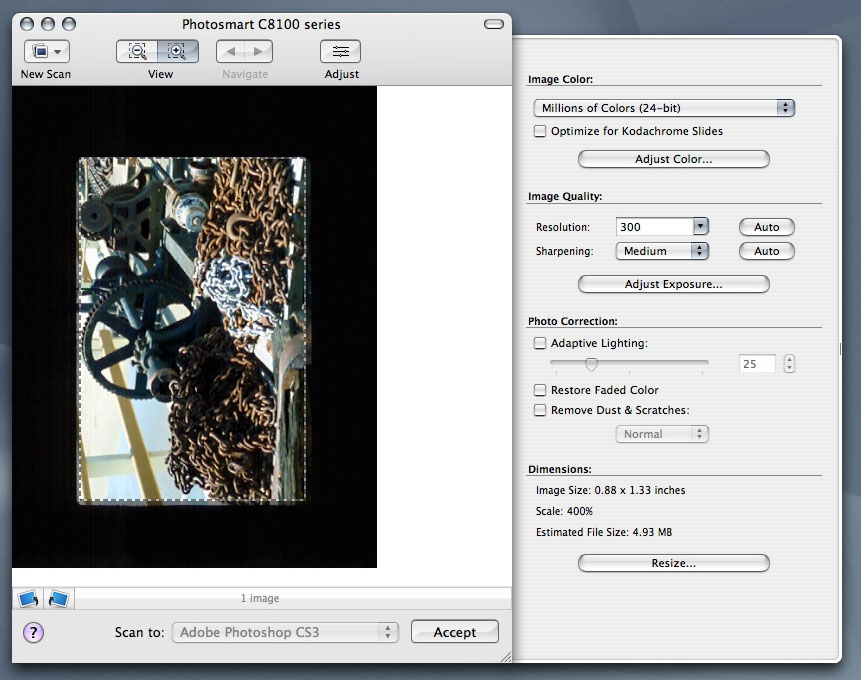
The Dust and Scratch Removal setting might be enabled in the HP software.rondus18 wrote:So is HP compensating for a problem that XnView doesn't know how to handle, or has HP made it so their hardware works best with their software?
-
Ty

- Posts: 152
- Joined: Thu Feb 23, 2006 3:18 am
- Location: San Luis Obispo, California
Re: Scanning with XnView
My understanding is that the TWAIN interface used by XnView and other imaging programs (to drive and control scanners and the scanning process) does not provide the same level of scanner control as does the scanner manufacturer's program. A scanner mfgr can make a new hardware-based feature, like spec/dust removal (which is a relatively new feature on many HP scanners), but that feature can only be activated by the mfgr's own software, because either (a) there is no TWAIN standard for this new feature, or (b) programs like XnView haven't yet implemented the TWAIN calls for the new feature. Keeping XnView (or any other TWAIN-based scanning program) up to date with all the latest developments in scanner technology is not, I believe, a very realistic objective.