How to use search to find files with file format error? (exiftool value) (bug?)

Ask for help and post your question on how to use XnView MP.

Moderator: xnview

KB9
Posts: 41
Joined: Thu May 21, 2026 6:51 pm

How to use search to find files with file format error? (exiftool value) (bug?)

Post by KB9 »

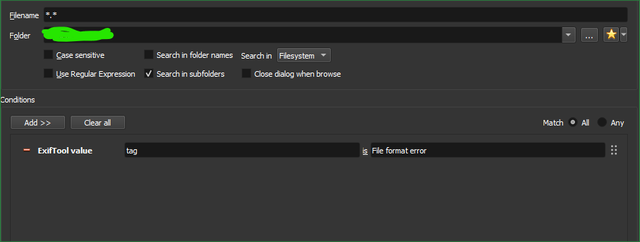
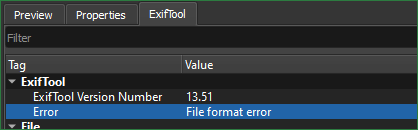
Search all files with this error:
Image

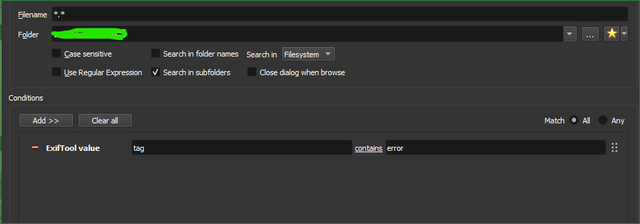
Not wotking:
Image

Not wotking:
Image

Not finding anything.

I few other as well ( exif all values) with File format error and error doesn'y find anything. Howto succeed?
jkm
Posts: 706
Joined: Sat May 11, 2024 12:43 am

Re: How to use search to find files with file format error? (exiftool value) (bug?)

Post by jkm »

Those are not actually tags, they are Exiftool diagnostic data. They are not searchable in XnViewMP. The field name you entered in the search dialog is invalid.

You can write a batch file or script if you want to directly test for exiftool errors.
KB9
Posts: 41
Joined: Thu May 21, 2026 6:51 pm

Re: How to use search to find files with file format error? (exiftool value) (bug?)

Post by KB9 »

jkm wrote: Sat Jul 25, 2026 5:18 pm Those are not actually tags, they are Exiftool diagnostic data. They are not searchable in XnViewMP. The field name you entered in the search dialog is invalid.

You can write a batch file or script if you want to directly test for exiftool errors.
Script for XnViewMP? Exiftool?

I don't want crawl files that has minor issues but still working. I noticed in some folders I have bunch of files that are
Exiftool: tag: Error
value: File System Error
KB9
Posts: 41
Joined: Thu May 21, 2026 6:51 pm

Re: How to use search to find files with file format error? (exiftool value) (bug?)

Post by KB9 »

Code: Select all

@echo off
setlocal

:: Set folders here (keep the quotes, do not add a trailing slash)
set "SOURCE_DIR=C:\path\folder"
set "DEST_DIR=C:\path\folder2"

echo Scanning for files with ExifTool errors...
echo Source: %SOURCE_DIR%
echo Destination: %DEST_DIR%
echo ---------------------------------------------------

:: The ExifTool command to find errors and move the files 
:: -r means scanning sub folders of %SOURCE_DIR%: remove -r if sub folders not needed
exiftool -charset filename=utf8 -r -if "$error" -Directory="%DEST_DIR%" "%SOURCE_DIR%"

echo ---------------------------------------------------
echo Scan and move complete!
pause
The above code found the files that I needed to remove - only produced "file system error" tagged files to destination dir where I checked the results and all were non-working files.

In Windows you need to have Exiftool.exe location (path) in Windows environment variables -> System variables -> path
(SystemPropertiesAdvanced.exe)