[1.11.2] 'Settings button’ disappears from the screen

*** Please report new bugs here! ***

Moderators: xnview, Dreamer

ctlu999
Posts: 3
Joined: Fri Jun 05, 2026 12:18 am

[1.11.2] 'Settings button’ disappears from the screen

Post by ctlu999 »

XnView: MP 1.11.2 [10040] 64-bit (Apr 30 2026) - Libformat 7.239 (MacOS)
OS: MacOS 26.5.1 - 64bit
MacBook Air(15-inch,M3,2024 )

The Buttons of Settings disappear from the bottom of the screen.

Effect: Unable to see and click the CANCER or OK buttons.

To reproduce:
1. MacOS > Menu Bar > (Apple icon) > System Settings... > Displays > Larger Text (1024 × 663) > Change Resolution
2. XnViewMP > Preferences... (Settings)
Actual behaviour (bug): 2 buttons get out of the screen.

Guess it cause by the ’Forehead’ of MacBook.
Because the Settings window display under the ’Forehead’.


Expected behaviour: Set the SettingsWindow to automatically resize to a smaller size.
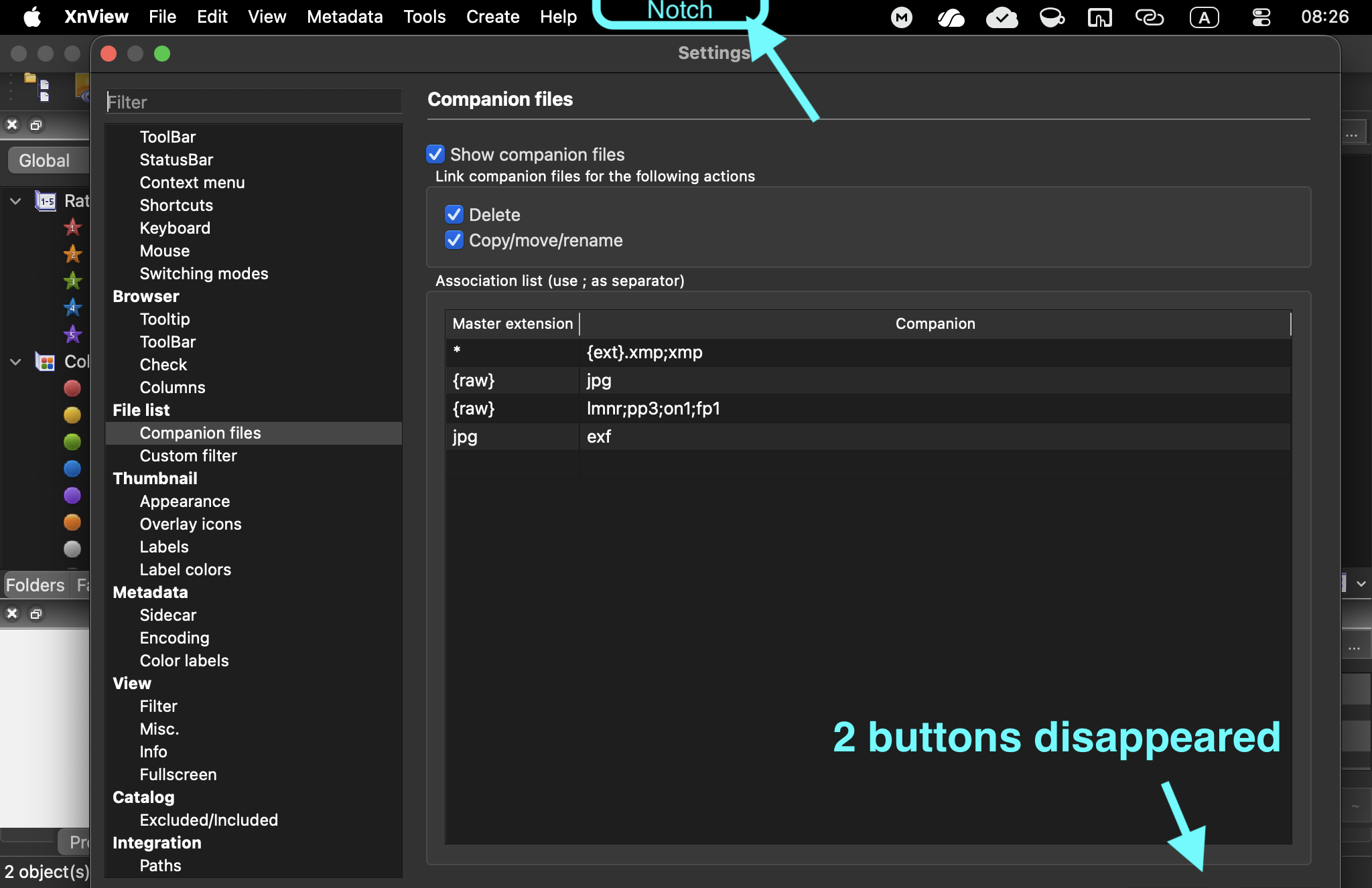
Image
Last edited by ctlu999 on Sun Jun 14, 2026 3:45 am, edited 2 times in total.
jkm
Posts: 565
Joined: Sat May 11, 2024 12:43 am

Re: 1.11.2: ‘Setup’s Button’ disappear from the screen.

Post by jkm »

Have you tried dragging the edges of the settings window to resize it?
ctlu999
Posts: 3
Joined: Fri Jun 05, 2026 12:18 am

Re: 1.11.2: ‘ Settings Button’ disappear from the screen.

Post by ctlu999 »

It can drag the edges left and right, but not work on the top and bottom.

But it can be double-clicking the window header to automatically resize it to fit the screen, then the 2 buttons Visible now.

Thank you for helping to solve this problem.